YarnPal - Crochet for Beginner
PIXELCELL PTE. LIMITEDLifestyle
4.71.45K Reviews
- Version
- 1.4.0
- Installs
- 1.00M
- Age Rating
- Everyone
Screenshots
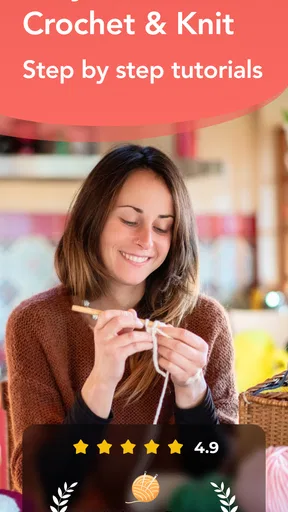
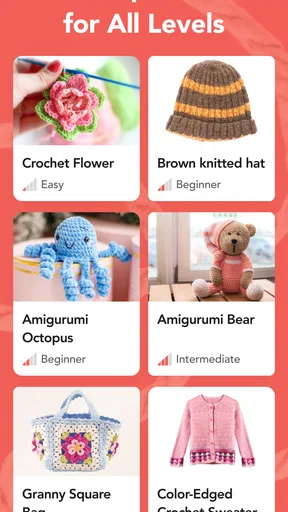
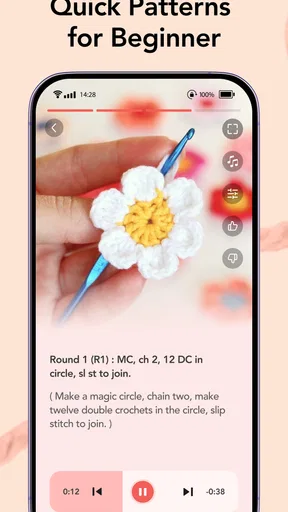
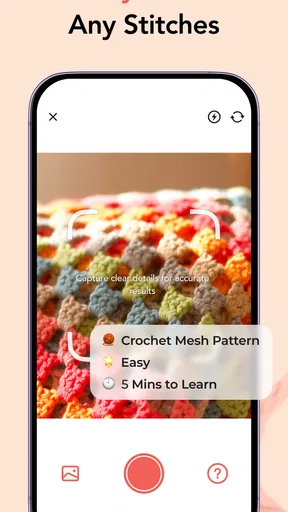
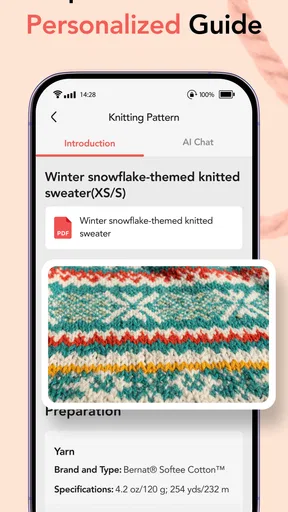
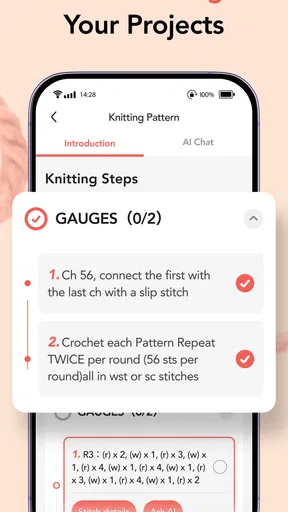
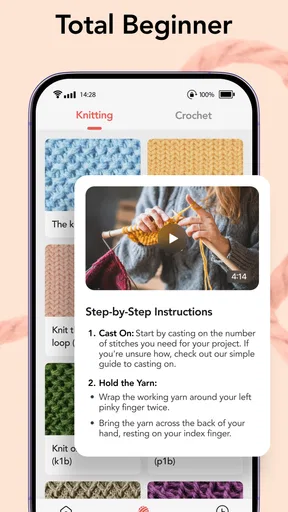
Our Review of YarnPal - Crochet for Beginner
 Analysis by Appyee
Ever found yourself in a creative rut and thought, "I wish I could crochet something?" Well, my friend, YarnPal - Crochet for Beginner is here to pull you out of that rut and throw you straight into a world of colorful yarn and endless possibilities. This app is like having a personal crochet tutor in your pocket, and let me tell you, it’s a game-changer.
What you can expect before you commit
I’d start with the practical question: what does trying YarnPal actually cost? It is a free lifestyle app from PIXELCELL PTE. LIMITED, so you can install it without paying upfront. The app also offers in-app purchases priced from $3.99 to $49.99 per item. That range is worth noticing before you treat every lesson or project as included: free access and paid options are not the same thing, and the price of an individual item does not tell you exactly what a particular purchase unlocks.
For me, that makes the sensible approach simple: explore the parts available without paying, then decide whether a specific paid option fits how you crochet. If you only want to test the waters, you do not need to begin by buying anything. If you already know you want ongoing guidance, look carefully at the purchase details in the app before spending. I would not judge the value by the highest price alone; it depends on whether the material you want is useful enough to justify its own cost.
Getting Started with YarnPal
When I first downloaded YarnPal - Crochet for Beginner, I was curious but a tad skeptical. I mean, how much can an app really teach you about crochet, right? Turns out, quite a lot! The app welcomes you with a super friendly interface and a quick setup process. You just need to create an account, pick your skill level (don’t worry, they’ve got you covered whether you’re a total newbie or just a bit rusty), and boom! You’re ready to dive into the world of crochet.
Features That Hook You In
What really got me hooked (pun intended) were the step-by-step tutorials. Each tutorial is broken down into bite-sized lessons, complete with videos and clear instructions. It’s like having a patient teacher right by your side. The app covers everything from basic stitches to more advanced techniques, so there's always something new to learn.
And guess what? There’s a nifty little library of patterns you can try out. Whether you’re into making cozy scarves or adorable amigurumi, YarnPal's got a pattern for you. The best part? You can save your favorite patterns for quick access later. It's like having a personal gallery of future masterpieces!
Turning a lesson into a real project
The most useful way to approach this kind of tutorial app is to treat a video as a reference at the worktable, not something to watch once and assume you have memorized. I’d choose one small project, keep its pattern saved, and work through the relevant instruction before starting each unfamiliar stitch. That creates a practical loop: watch, try a few stitches, pause to compare, then continue. It is less frustrating than jumping between several projects and forgetting which technique each one needs.
A small everyday example: if I had a quiet half hour after dinner, I could open a saved pattern, check the next step, and work a short section without needing to plan a whole crafting afternoon. If a stitch looks different from the demonstration, I would undo only a few stitches and compare again rather than carry a mistake through the whole piece. Crochet is tactile, so an on-screen lesson can show movement, but it cannot feel whether your yarn tension is too tight. That is still something you learn by handling the yarn.
There is also a useful distinction between learning a stitch and finishing an object. A beginner can follow a basic lesson and still find a full pattern challenging when counting rows, changing yarn, or keeping the shape even. I would use the app to build confidence in one technique at a time, then choose a project whose size and complexity feel manageable. Saving a pattern helps with returning to it, but it does not replace keeping track of your physical work; a quick note about where you stopped can save time when you pick it up later.
Community Vibes
Now, I don’t know about you, but I love a good community vibe, and YarnPal delivers. There’s a whole section dedicated to connecting with fellow crochet enthusiasts. You can share your creations, get tips, and even join crochet challenges. It’s a great way to stay motivated and inspired, especially on those days when your yarn seems more tangled than your thoughts.
When community advice helps—and when it doesn’t
Sharing a project can be useful when you want encouragement or a second opinion on how your work is coming along. I would ask focused questions rather than simply posting a photo: for example, explain which part of a pattern is confusing or what result you are trying to achieve. That gives other crocheters something concrete to respond to. Challenges can also provide a gentle reason to finish a project, though I would treat them as optional motivation, not a deadline that turns a relaxing hobby into homework.
Community feedback has limits, too. A suggestion from another user may reflect their yarn, hook, tension, or personal preference, so I would not assume every tip is universally right. If advice conflicts with a tutorial, compare the actual stitch and pattern instructions before changing your work. For a beginner, this is an important habit: use the community to gather ideas, but make one adjustment at a time so you can tell what helped.
Ease of Use
Even if you’re a tech newbie, navigating through YarnPal is a breeze. The app’s layout is clean and intuitive. You won't find yourself fumbling around trying to figure out where things are. Everything is right where you need it, from the tutorial section to the community chat. Plus, the app runs smoothly without any annoying lags, which is always a big win in my book.
How it fits alongside other ways to learn
Compared with searching for individual crochet videos, having lessons and patterns gathered in one app can make it easier to stay on one learning path instead of opening unrelated clips and losing your place. The saved-pattern library is particularly handy when you already know what you want to make and need to return to its instructions. On the other hand, free videos across the wider web may offer more perspectives on the same stitch, which can help if one explanation does not click for you.
A printed pattern or book is still better for someone who prefers to scan instructions at a glance, mark a page, or keep a reference beside their yarn without switching between screens. A local crochet group may be more useful when you need someone to look closely at your hands and correct tension in real time. I see YarnPal as a convenient learning companion, not a replacement for every other resource. If you value a guided app experience and like having community alongside lessons, it has a clear advantage; if you need hands-on correction or prefer paper, another approach may suit you better.
Why YarnPal Stands Out
One of the standout features for me is the progress tracking. You can see how far you’ve come, which projects you’ve completed, and what you’ve learned. It’s a great way to keep track of your journey and celebrate your successes along the way. Trust me, there’s nothing quite like the satisfaction of ticking off a completed project.
Additionally, the app is constantly updated with new content, so you never run out of things to try. The developers are clearly passionate about crochet and it shows in the quality and variety of the resources they provide.
Who is likely to get the most from it?
I think YarnPal makes the most sense for someone who is starting crochet and wants a structured place to begin, or for a returning crocheter who remembers the basics but wants a refresher before tackling a new pattern. The combination of instruction, saved projects, progress tracking, and social encouragement suits people who enjoy learning in small steps. It can also help a casual crafter who wants to make a scarf or try amigurumi without first building a large collection of reference material.
It is less suited to a crocheter who already knows the stitches they use and mainly wants a huge, specialized pattern archive, or to someone who expects an app to diagnose every mistake from a photo. A person who dislikes creating accounts or sharing in an online community may also prefer a book or a set of standalone tutorials. The app is rated for Everyone, and its current version is 1.0.7; it is available for devices running Android 10 or later. Those details make it easier to judge basic fit, but they do not change the more important question: whether its learning style matches yours.
Small habits that make the app more useful
Before beginning a project, I would check the pattern from start to finish and note any unfamiliar terms or techniques. That quick preview helps avoid discovering halfway through that a later step requires a stitch you have not practiced. I would also keep the yarn and hook I intend to use beside me while watching a lesson, then pause after each new movement to try it myself. A video feels clear when watched passively, but the real test is whether you can reproduce the motion with your own materials.
For a longer project, progress tracking can encourage you, while a simple personal note can preserve the exact row or round where you stopped. Those two forms of tracking solve different problems: the app helps you see your broader learning progress, and your note helps you resume the physical item without guessing. If you are choosing between two patterns, I would favor the one whose instructions you can understand and whose finished size you actually want, rather than picking the most impressive-looking project. That is a modest way to avoid abandoned starts.
Cost, expectations, and the final call
With a 4.6 average from around 97,000 ratings and more than a million installs, YarnPal has clearly found an audience, though popularity alone does not guarantee it will fit every learner. It is free to download, rated for Everyone, and includes optional in-app purchases ranging from $3.99 to $49.99 per item. I would treat the free starting point as a chance to see whether the teaching style works for me, then consider a purchase only after checking what it covers and whether I will use it.
Would I recommend it? Yes, with a clear condition: I would choose YarnPal if I wanted guided crochet lessons, patterns I can revisit, and a community element in one place. I would skip it if I needed in-person help with hand position, preferred paper instructions, or wanted to browse many independent explanations before settling on one. As a free entry point into crochet, it is appealing; the paid options make sense only when a specific item offers value for the way you craft. If you like learning by watching, practicing, and returning to a saved project at your own pace, YarnPal - Crochet for Beginner is a friendly place to start.
One last practical point is that the app’s strengths depend on how you use it. Someone who opens a lesson, keeps the yarn in hand, and repeats a technique is likely to get more out of it than someone who only watches several tutorials in a row. I would choose a calm, well-lit spot, keep the screen positioned where both hands remain free, and pause whenever a step moves too quickly. That simple setup makes a phone-based lesson feel much more like a usable reference than a video playing in the background.
For me, the decision is not whether an app can make crochet effortless; it cannot remove the need to practice, count, and sometimes undo a section. The useful question is whether it can make the next step clearer and help you keep returning to the craft. YarnPal looks best for learners who want that nudge and enjoy a structured digital companion. If you want direct coaching or already have a learning method you love, there is no need to switch. But for a beginner curious about turning spare moments into steady practice, it is a reasonable app to try before deciding whether any paid content is worth adding.
Privacy and Permissions
See what permissions an app requests and how it handles your data.
- Photos/Media/Files
- read the contents of your USB storage, modify or delete the contents of your USB storage
- Storage
- read the contents of your USB storage, modify or delete the contents of your USB storage
- Camera
- take pictures and videos
- Wi-Fi connection information
- view Wi-Fi connections
- Other
- view network connections, full network access, run at startup, control vibration, prevent device from sleeping, Google Play license check
Verdict
Strengths of YarnPal - Crochet for Beginner
- Easy-to-follow tutorials for beginners.
- Wide variety of crochet patterns available.
- User-friendly interface with clear navigation.
- Regular updates with new patterns and tips.
- Community forum to share projects and ideas.
Limitations of YarnPal - Crochet for Beginner
- Limited advanced patterns for experienced users.
- Occasional bugs in the pattern download feature.
- Requires an internet connection for most features.
- Ads can be intrusive in the free version.
- Some features locked behind a subscription.
Other Releases by PIXELCELL PTE. LIMITED
View All
Sewpal: Sewing Pattern & Guide
Lifestyle4.8
Similar Picks in This Category
View All
SmartThings
Samsung Electronics Co., Ltd.4.6

Google Home
Google LLC4.0

Pinterest4.2

Astrotalk - Talk to Astrologer
Astrology & Horoscope4.7

My Verizon
Verizon Consumer Group4.5

Samsung Wallet (Samsung Pay)
Samsung Electronics Co., Ltd.4.1
Frequently Asked Questions
What is YarnPal and how does it help beginners in crochet?
YarnPal is a mobile app designed specifically for beginners looking to learn crochet. It offers step-by-step tutorials, video guides, and a community forum for beginners to connect with experienced crocheters. The app provides easy-to-follow instructions, making it an ideal starting point for those new to the craft.
Does YarnPal offer patterns and projects suitable for beginners?
Yes, YarnPal features a wide range of beginner-friendly patterns and projects. From simple scarves to basic amigurumi, the app provides detailed instructions and material lists to guide users through each project, ensuring a smooth learning curve for those just starting out.
Are there any in-app purchases or subscriptions required for YarnPal?
YarnPal offers a free version with basic features, but for access to premium content such as advanced tutorials and exclusive patterns, users can opt for a subscription. The subscription model ensures continuous updates and access to new content, enhancing the learning experience.
Can I interact with other users on YarnPal?
Yes, YarnPal includes a community feature where users can interact with each other. Beginners can ask questions, share progress, and get advice from more experienced crocheters. This sense of community support can be incredibly helpful and motivating for new users.
Is YarnPal available on both Android and iOS devices?
YarnPal is available for download on both Android and iOS platforms. The app is optimized for a seamless experience on smartphones and tablets, allowing users to access content and tutorials on their preferred device, anytime and anywhere.
